Carousel Photo Frame Vector Template for Laser Cutting
Today there is a 80% discount in honor of the store's Birthday!

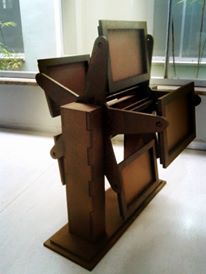
Digital vector template for a rotating Carousel Photo Frame — ready-to-cut laser cutting files to make a four-sided, rotating photo carousel from plywood, MDF, acrylic or cardboard. This clean, precision-designed vector model is perfect for makers, laser shop owners, hobbyists and small manufacturers who run CO2 or diode lasers, CNC routers, scroll saws or cutting plotters. Use it to create unique home d?cor, personalized gifts, wedding centerpieces, retail display pieces or craft-fair products.
Key features:
- Instant digital download: SVG, DXF, AI, EPS, PDF files included for maximum compatibility.
- Designed for laser cutters and CNC: works well with Glowforge, Epilog, Trotec, Full Spectrum, K40 and most router/CNC setups.
- Smart construction: tab-and-slot interlocking parts for quick assembly; glue optional for extra strength.
- Material options: optimized for 3 mm (1/8") plywood or MDF; easily scaled for 4–6 mm materials. Files are fully scalable to fit your project size.
- Easy customization: vector layers separated for frames, supports and decorative panels — edit in Illustrator, Inkscape or your CAM software.
- Clear instructions: assembly notes and recommended cut order included. Test cut recommended to adjust for your machine kerf.
Suggested finished size (approximate, scalable): about 180–220 mm height with four photo frames (fits small photos or 2x3 / 3x3 inserts depending on scale). Final dimensions depend on material thickness and scaling chosen in your software.
Who this is for:
- Laser hobbyists and makers who want a turnkey vector project.
- Small businesses offering customized wooden gifts and home decor.
- Fabrication shops that need ready-made, attractive designs to produce quickly.
What you get:
- Zip file with SVG, DXF, AI, EPS, PDF
- Assembly guidance and cut order notes
- Commercial-friendly usage for finished physical items (check license details before resale)
How it works:
1) Purchase and download the ZIP file instantly.
2) Open in your cutting software, adjust scale or material thickness as needed.
3) Do a test cut, set power/speed for your material, then cut final parts.
4) Assemble the carousel with tabs and slots; sand or finish as desired.
Bring your photos to life with a rotating, handcrafted display—fast, precise and fully customizable. Download now and start cutting.